Crop, resize and download your photo, signature & Aadhaar card exactly as required — free, private, done in your browser.
Specifications below are set for the Protean (NSDL) portal.
We didn't invent these numbers — they're what NSDL and UTIITSL actually publish. Both reference sheets below are pinned here so you can check them against whatever you download above.
Nothing here is automated guesswork — each step is deterministic, so the same photo produces the same output every time.
A recent, front-facing photo works best. The crop window opens the moment the file loads — nothing uploads anywhere first.
You can't accidentally pick the wrong ratio — it's fixed to whichever portal is selected above. Drag the corners, not the shape.
The tool searches for the highest JPEG quality that still lands under the KB limit, then stamps the correct DPI into the file header.
Black or blue ink, plain paper, decent light. The signature crop box is landscape and locked the same way the photo one is.
Whatever pixel size you pick for the front side is copied over automatically, so the two halves line up when merged.
Both Aadhaar sides, one page, ready to attach as identity or address proof on either portal.
Whichever toggle you left selected above is reflected here too.
| Dimensions | 3.5 × 2.5 cm |
| Orientation | Portrait (vertical) |
| Format | JPEG / JPG |
| Resolution | 200 DPI minimum |
| File size | 20 KB – 50 KB |
| Background | Plain white preferred |
| Face coverage | 70–80% of frame |
| Dimensions | 4.5 × 2 cm |
| Orientation | Landscape (horizontal) |
| Format | JPEG / JPG |
| Resolution | 200 DPI minimum |
| File size | 10 KB – 50 KB |
| Background | Plain white paper |
| Ink colour | Black or blue preferred |
| Required | Front & back, one PDF |
| Format | PDF (merged images) |
| Resolution | 200 DPI |
| Max size | 300 KB per page |
| Both sides | Must be clearly visible |
| Accepted by | NSDL & UTIITSL |
The portals occasionally revise these limits without much notice — cross-check against onlineservices.nsdl.com or pan.utiitsl.com before you submit.
Both issue the same PAN card. The paperwork just isn't identical — here's where they actually differ.
| Detail | Protean (NSDL) | UTIITSL |
|---|---|---|
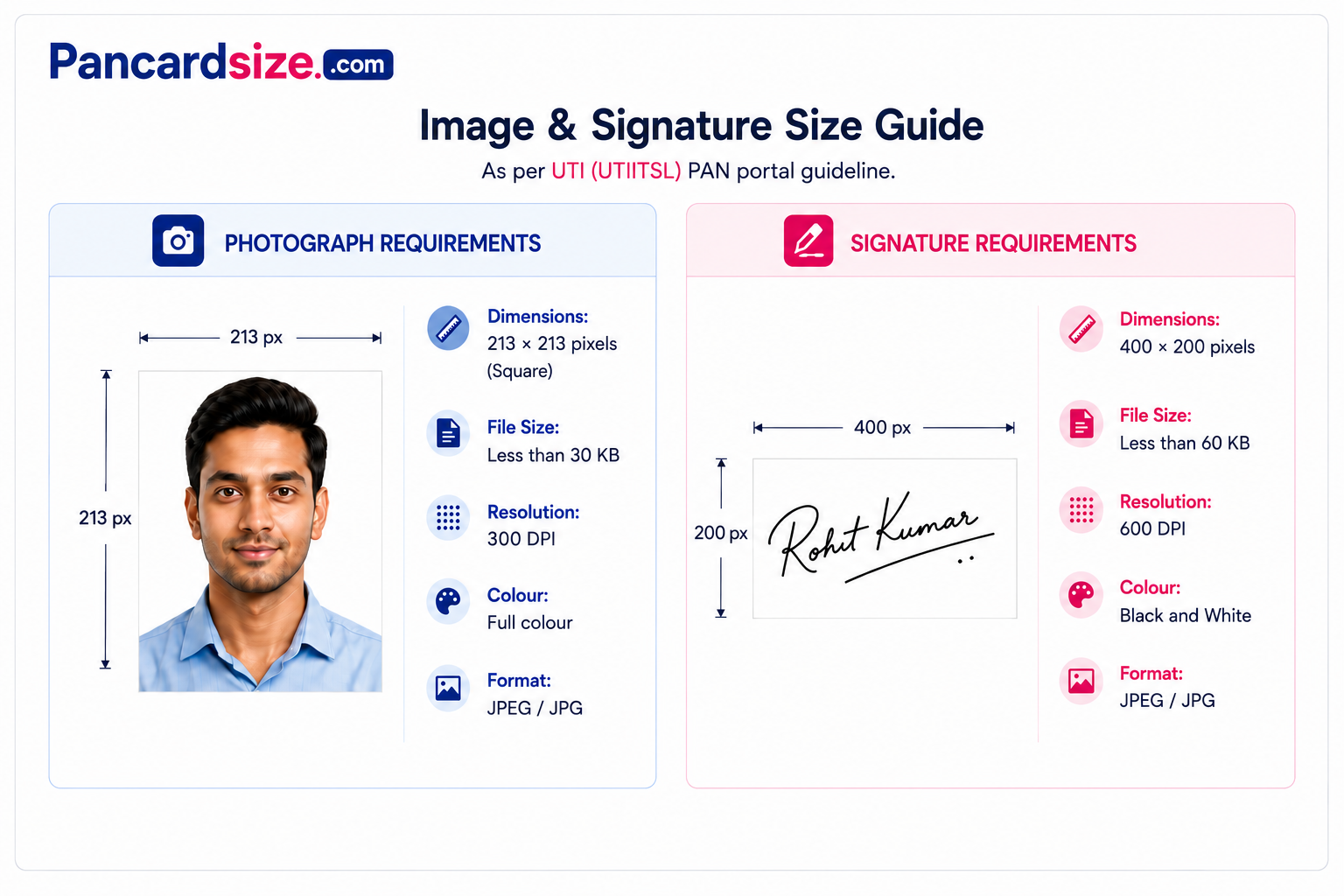
| Photo shape | Portrait, 3.5×2.5 cm | Square, 2.5×2.5 cm |
| Photo resolution | 200 DPI | 300 DPI |
| Photo file cap | 20–50 KB | Up to 30 KB |
| Signature resolution | 200 DPI | 600 DPI |
| Signature file cap | 10–50 KB | Up to 60 KB |
| Typical processing time | 15–20 working days | 15–20 working days |
| Physical PAN Kendra network | Wider, more branches | Fewer, larger centres |
Processing times fluctuate with application volume — treat them as a rough guide, not a guarantee.
Nothing on this list is unusual — it's the difference between one pass through the tool and three.
Most portals expect something taken in the last six months.
White A4 sheet, black or blue ink, for the signature shot.
Flat, well lit, no glare across the text.
The crop ratios genuinely differ — check before you crop.
Cropping is quick, but redoing it after a bad first pass isn't.
Three files come out of this: photo, signature, Aadhaar PDF.
None of these are visible to the naked eye — they only show up once the portal reads the file.
Screenshots strip the DPI metadata the portal checks for. Start from the original photo file, never a screenshot of it on a screen.
WhatsApp, then a random "compress image" site, then this tool — each pass throws away more detail than the last. Start from the highest-quality copy you have.
A tilted phone camera skews the crop ratio even if it looks fine to your eye. Shoot straight down, ink flat on the table.
NSDL wants a portrait photo; UTIITSL wants a square one. A file that passes one will be rejected by the other.
Overhead lights cast a shadow from the phone itself. Diffuse light — near a window, not under a bulb — reads more evenly.
Changing "IMG_4021.heic" to "photo.jpeg" doesn't convert the file. Some portals reject the format outright.
Grey ink on cream paper compresses into mush at low file sizes. Black or dark blue ink holds up far better under compression.
A number stored inside the image file describing intended print resolution. It doesn't change what the photo looks like on screen — only what a printer or portal reads as its physical size.
The file format almost every portal requires for photos and signatures. It shrinks file size by discarding detail — the more it's compressed, the smaller and blurrier the result.
The relationship between an image's width and height. A photo cropped to the wrong aspect ratio will look distorted once the portal resizes it to fit its template.
Any government-issued ID used to confirm who you are and where you live — Aadhaar, passport, voter ID and similar documents all qualify.
A ten-character alphanumeric ID issued by the Income Tax Department, used to track financial transactions and file tax returns.
The 15-digit code you receive after submitting your application — keep it, it's how you track status and raise corrections later.
Rough timing, based on how both portals usually process a clean application.
Save the 15-digit acknowledgement number somewhere you won't lose it — it's the only way to track status before the card is issued.
The portal checks your photo, signature and Aadhaar against its own format rules. This is the stage where a wrong file size or aspect ratio gets flagged.
A digital copy lands in your registered email — usable immediately for most purposes that ask for a PAN.
The printed card is mailed to your registered address. Delivery time varies by location and courier load.